Keep up with your channels.
Keep the videos worth revisiting.
Group the YouTube channels you choose into topic Feeds, with new uploads in publish-date order. Save useful videos into Studies with your own notes, so you can return with context.
Works in your browser, with no extension to install. Videos open on YouTube.
Try Plus free for 7 days. No card required, no automatic charge, and up to 50 channels during trial. Plus is $7/month or $59/year.
You subscribed for a reason. The algorithm has other plans.
You followed those channels on purpose. Then the home feed buried their uploads under Shorts, recommendations, and videos you never asked for. Sitting down to learn one thing turns into twenty minutes scrolling away from it.
Your channels, buried
New uploads from the channels you chose get lost under recommended videos.
Shorts everywhere
A wall of vertical clips you never subscribed to, sitting in front of the content you did.
Watch Later rots
The videos you meant to return to vanish into a list with no order and no notes.
Focus, gone
You came to learn one thing and left having watched five others.
A surface that shows you what you chose. Nothing else.
Feedvault is not an extension that patches YouTube. It is a separate place you open. Two ideas run it: Feeds for keeping up, Studies for going deep.
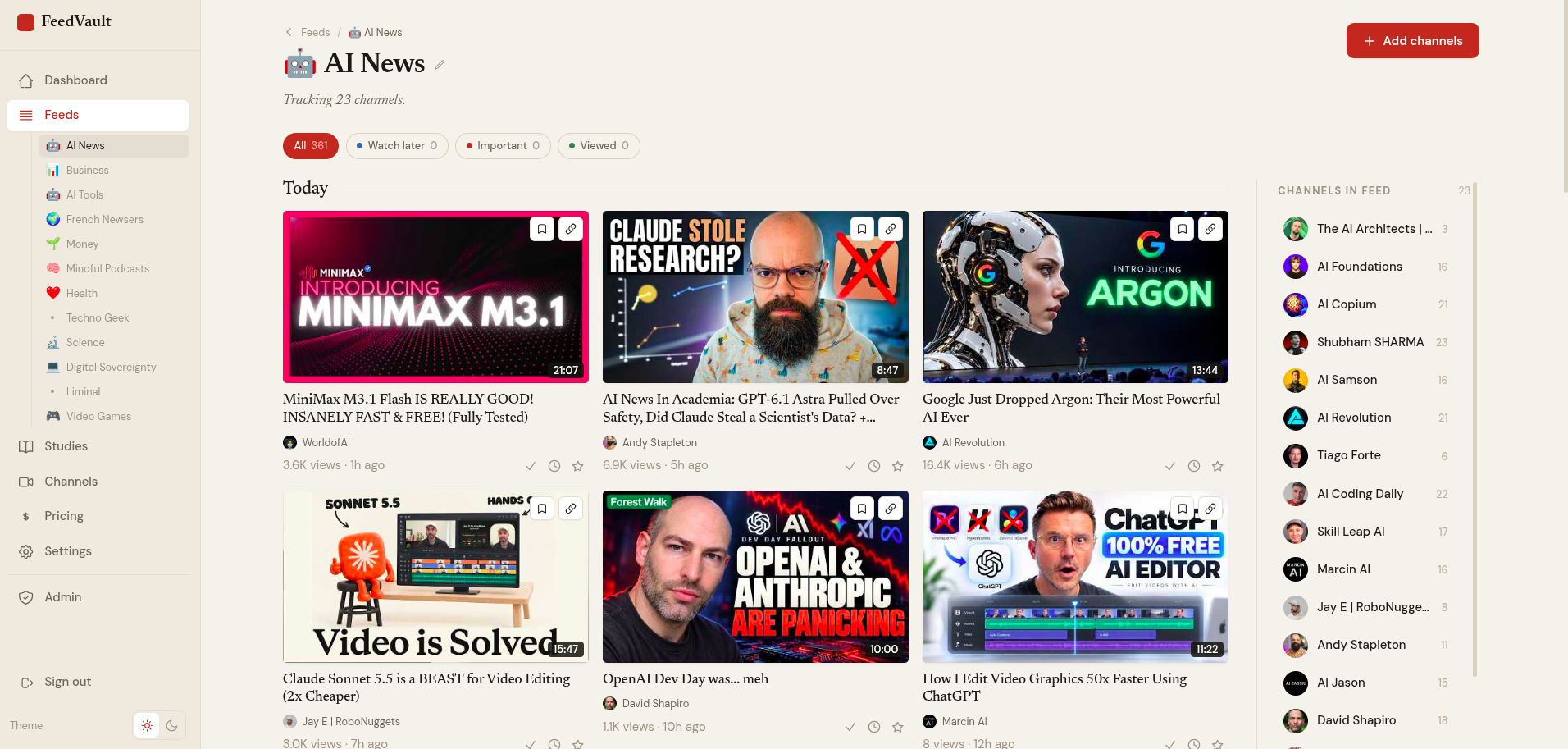
Feeds: your channels, newest first.
Group channels into a Feed by topic. Eligible new uploads appear in publish-date order, with no recommendations inserted between them. Feedvault filters likely Shorts from its Feed using duration and aspect ratio. Because YouTube does not provide a native Shorts label here, the filter may not identify every Short. This is your own focused view of the channels you chose.
Learn how to organize channels by topic →
- Group by topic, project, or mood
- Newest first, always. No algorithm in between
- Likely Shorts filtered from your Feed
- An emoji icon per Feed for fast scanning
Studies: a notebook for the videos worth keeping.
Save a video into a Study and write down why it matters. Keep tutorials, talks, recipes, and other useful videos by topic, with a free-text note on each. You can type a timestamp into your note; timestamps are not captured automatically.
Compare ways to save videos with notes →
- Save by URL, or directly from a video in a Feed
- A free-text note on every saved video
- Watch-later, important, and viewed status flags
- An emoji icon per Study
Build a Feed. Keep what matters. Watch with focus.
Build a Feed
Create a Feed, give it an emoji, drop in channels by URL or name. New uploads stream in automatically.
Keep what matters
Save standout videos into a Study with a note on why. Build your own reference library.
Watch with focus
Filter by date, channel, or topic. Flag watch-later, important, viewed. No filler, no suggestions.
Works in desktop and mobile browsers. Playback opens on YouTube.
Choose the workflow you’ll actually use.
| Capability | YouTube subs | Unhook | PocketTube | Feedvault |
|---|---|---|---|---|
| A standalone app you open instead of YouTube | n/a | No | No | Yes |
| Subscribed-channel uploads, newest first | Yes | via YouTube | via YouTube | Yes |
| Save videos with free-text notes (Studies) | No | No | No | Yes |
| Group channels by topic | No | No | Yes | Yes |
YouTube’s Subscriptions tab already shows recent uploads from channels you follow. Free tools may be enough if you only want fewer distractions or channel folders. Feedvault combines topic-based Feeds and Studies with notes in a separate browser workspace. Playback still opens on YouTube.
Why I built Feedvault.
I follow channels to learn, but the home feed kept burying their uploads under recommendations I never asked for. YouTube's Subscriptions tab already lists recent uploads, but I wanted to group my chosen channels into focused Feeds and keep the videos worth returning to in Studies. So I built it, and I use it every day.
One product. Two ways to pay.
Choose $7/month or $59/year. Both plans include the same Plus features, with up to 500 channels. No ads in the Feedvault interface; normal YouTube playback still applies.
The full product, one month at a time.
- Unlimited Feeds & Studies
- Up to 500 channels with Plus
- Chronological channel uploads
- Notes on saved videos
No card required. Up to 50 channels during your trial. Choose a subscription when you are ready; there is no automatic charge.
Save $25 a year — about 30% compared with monthly.
- Unlimited Feeds & Studies
- Up to 500 channels with Plus
- Chronological channel uploads
- Notes on saved videos
No card required. Up to 50 channels during your trial. Choose a subscription when you are ready; there is no automatic charge.
Both plans include the same Plus features. After the trial ends, your saved content stays readable. A Plus subscription is required to add new content and keep Feeds refreshing. Prices exclude applicable taxes, which are added at checkout.
Your focused YouTube starts here.
Chronological Feeds. Studies for the videos that matter. No recommendation ranking.
Create your account7-day trial with no card required and up to 50 channels. Saved content stays readable after expiry; adding new content and background refresh require Plus. No automatic charge.